Transfer Print to Screen with MeOCR Image To Text Converter
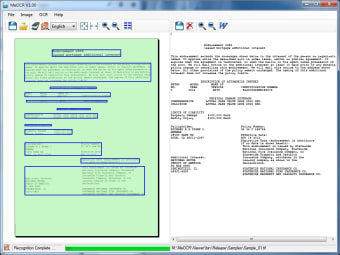
MeOCR Image To Text Converter is a free tool that offers quick and straightforward means of converting an image file into an editable word document. So, if you have scanned a written document and would like to edit tis contents in a word processor, this tool will allow you to do just that.
Anyone who works with documents in both printed and digital formats will be aware that there are times when you will need to transfer a document between the two. It is easy enough to print a digital document onto paper, but the reverse process of transferring a printed document into digital text is harder. Thankfully, with MeOCR Image To Text Converter, you will have a free and simple method of turning a scanned text document into a text file. It can also be used in other circumstances: for example you can take a screenshot of a webpage or ebook and turn that into a text file.
A Quick and Simple Solution
With MeOCR Image To Text Converter, you will be able to convert a document using just a single click. The program is designed to keep the format of the original document, saving you valuable time in fiddling around trying to reformat. MeOCR Image To Text Converter works with all the major image file formats and covers a range of different languages.
Pros
Free to use.
A quick way to convert images to text.
Cons
May be too simple if you prefer hands-on editing.
Only useful if you regularly convert images to text.
MeOCR 1.0 converts your scanned documents to editable text documents using OCR and exports them to Microsoft Word.
MeOCR 1.0 converts your scanned documents to editable text documents using OCR and exports them to Microsoft Word with one click. MeOCR also retains the original document formatting thereby saving you time and effort by not having to reformat the text. Me OCR is a fast reliable and accurate image to text OCR conversion application. Use it to save time and money by not having to retype your documents.
Supports supports all the major file formats. bmp, tiff, jpeg, gif, png.
MeOCR is simple and easy to use. It retains formatting and formats the text without textboxes and margin settings which make it difficult to edit and reformat you document after scanning. MeOCR Supports supports all the major file formats. bmp, tiff, jpeg, gif, png. High accuracy - Saves time by reducing the number of corrections and editing needed.
MeOCR targets any user wishing to convert their digital documents into editable text / word processing documents.
Laws concerning the use of this software vary from country to country. We do not encourage or condone the use of this program if it is in violation of these laws. Softonic may receive a referral fee if you click or buy any of the products featured here.














.png)